Step 1:
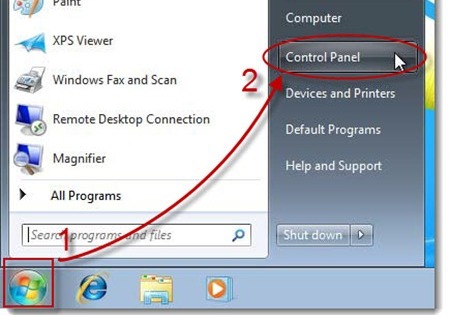
Make sure your Outlook 2010 is closed, and access your computer’s ‘Control Panel,’ usually found under the ‘Start’ menu.
Step 2:
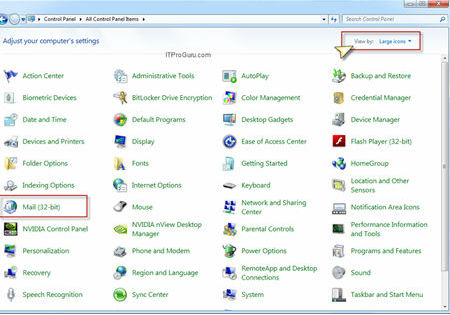
Choose to ‘View by: Large Icons’ to make sorting easier, then click the ‘Mail (32-bit)’ option to access the mail profiles.
Step 3:
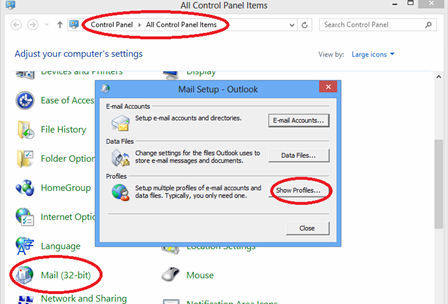
Select ‘Show Profiles’ from the ‘Mail Setup’ pop up screen
Step 4:
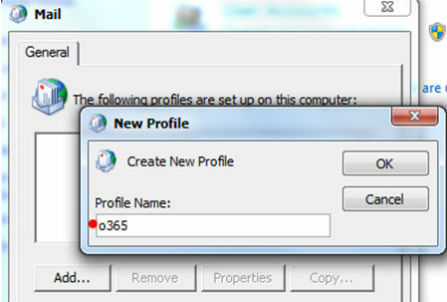
Type the name of the new profile in the ‘New Profile popup then ‘OK.’
Step 5:
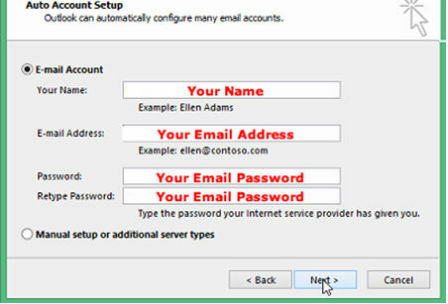
Enter your name, email address, and then password twice to verify. Hit ‘Next.’
Step 6:
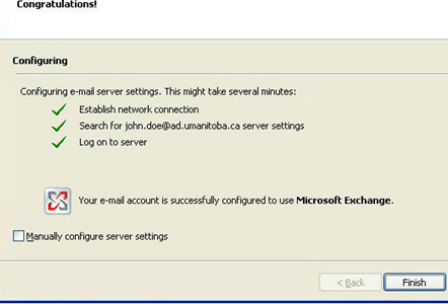
Click ‘Finish’ and restart your Outlook 2010 to begin using your Exchange mailbox!